Real-time voice translation · Windows
Speak your language.
They hear theirs.
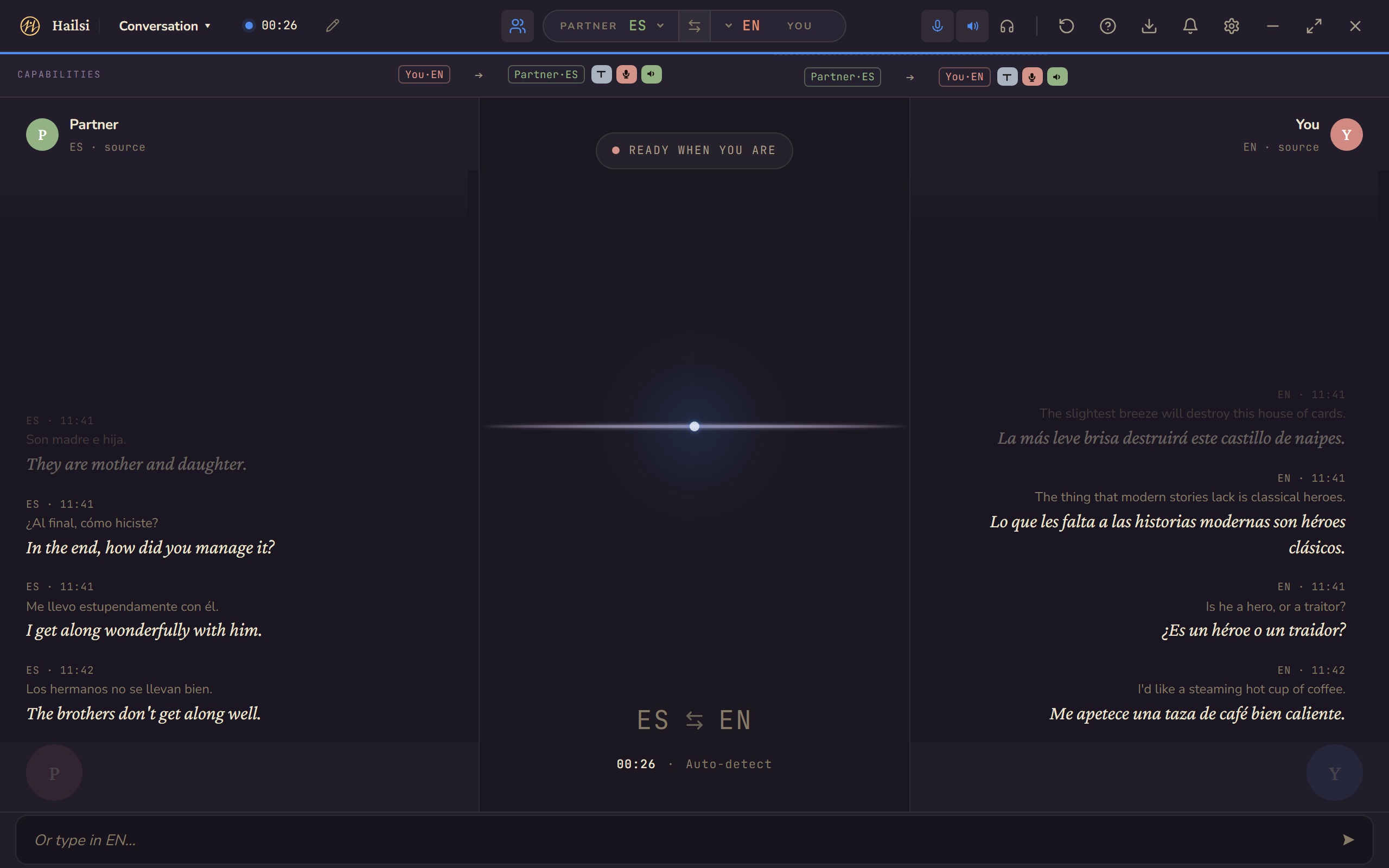
Talk naturally in your own language; the person with you hears you in theirs, spoken aloud in a natural voice, right there in the room. Your voice never leaves your PC: your computer does the translating, right where you are. That's why it's private, and why it works offline.
Only you need Hailsi·The person you're talking to installs nothing.
Windows 10 (22H2) or Windows 11 · Free tier is the full translator · Pro is one-time, not a subscription · What's new
-
-
-
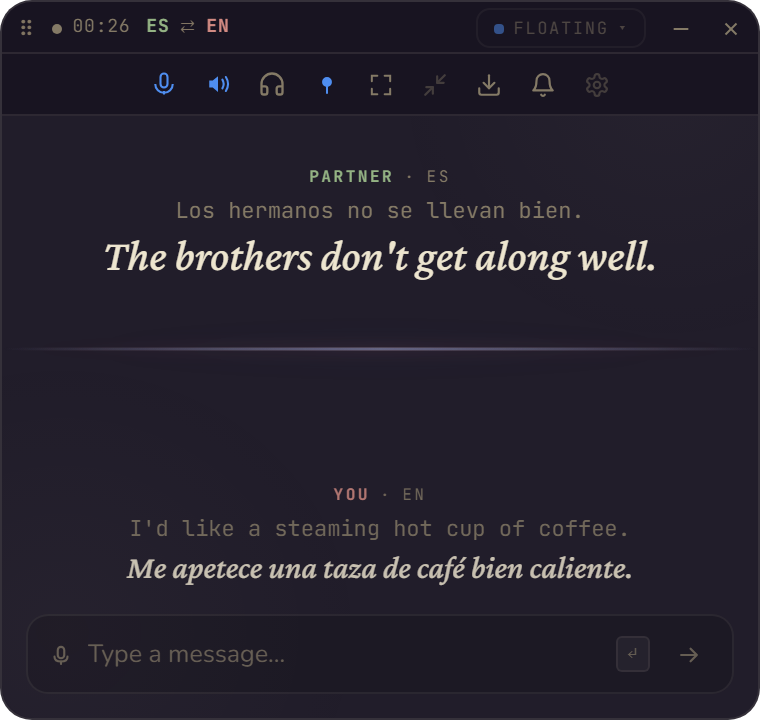
Floating free
A small always-on-top panel that rides over the game or the call.
For when the conversation should stay visible, but not take the screen.
Compact free
The pill — the same conversation in one narrow strip.
For when Hailsi should be out of your way entirely and the talk keeps flowing.

-
-
-
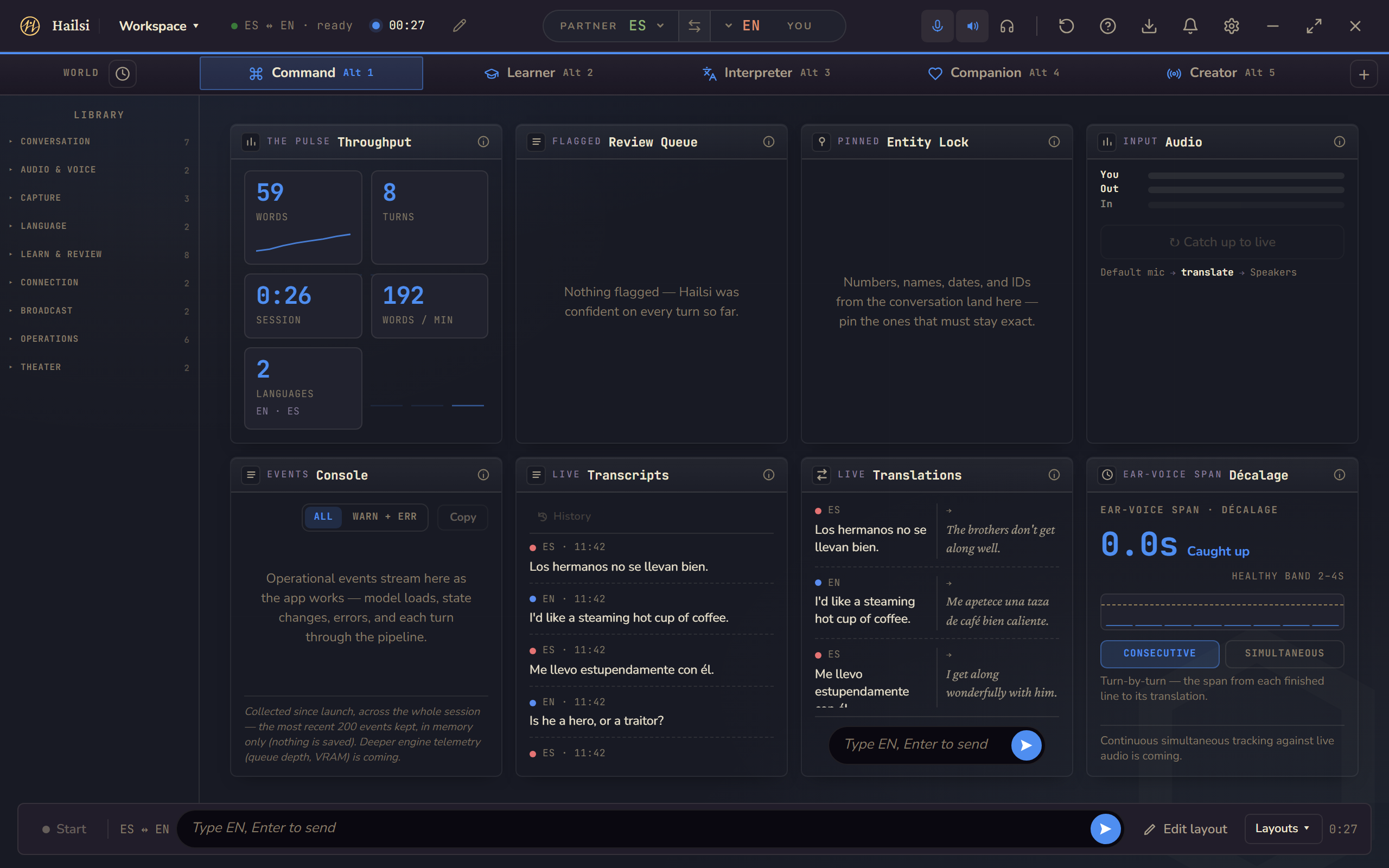
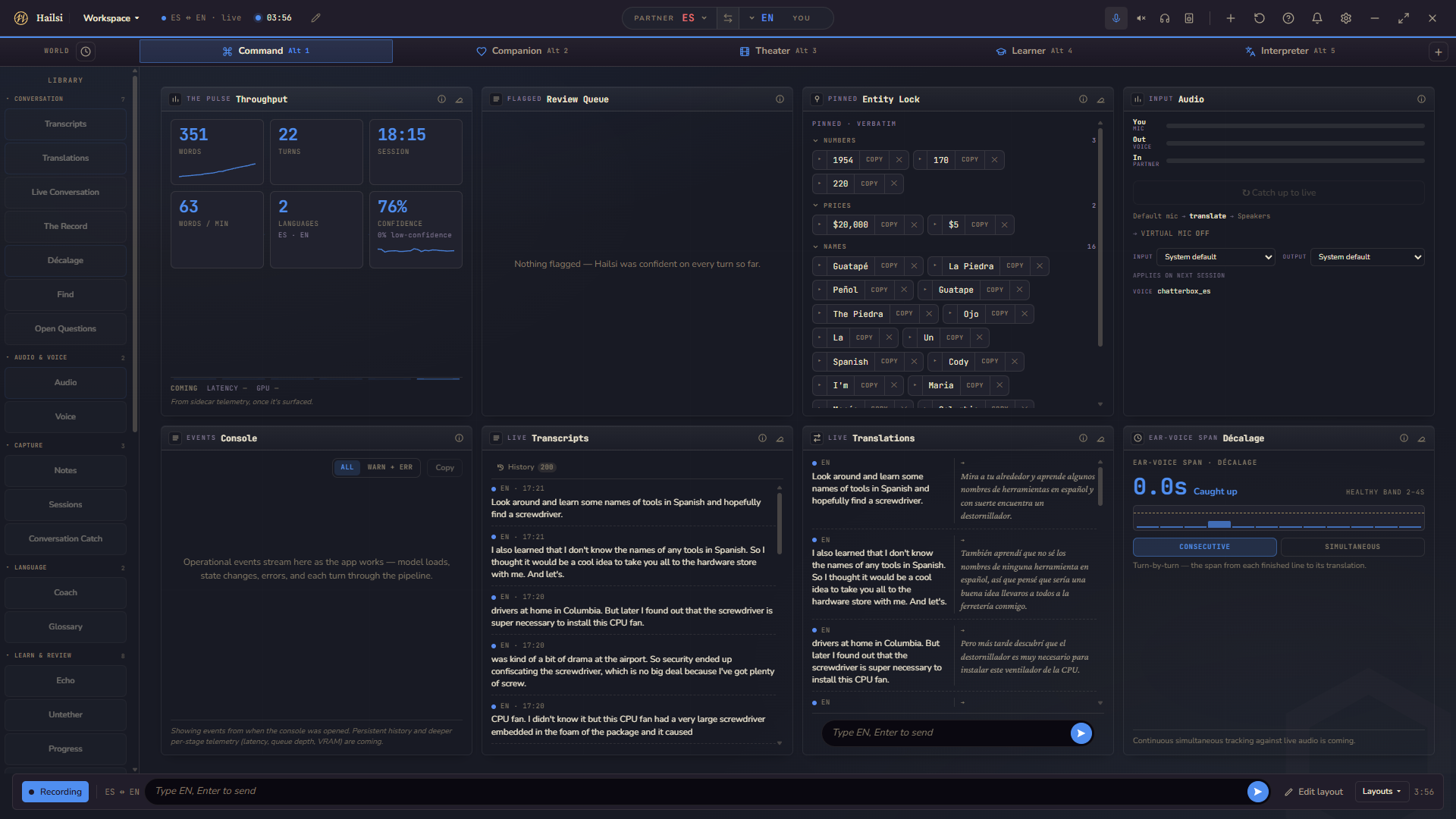
Command (Pro) — the Workspace's instrument grid: throughput, live transcripts, and the ear-voice span between a line and its translation.
How it works
Four steps, all on your machine.
-
You speak.
Hailsi listens to your microphone and picks up what you said, the moment you finish saying it. (It can translate what you hear too — the other side of the call, a video — that's the section just below.)
-
Hailsi transcribes, locally.
Your audio runs through speech recognition on your own computer. No upload, no cloud trip — your words stay where you said them.
-
Translation runs locally too.
The transcribed text is translated by a language model that lives on your computer — typically 2–3 seconds end-to-end for a short sentence on an ordinary desktop CPU, under a second on a mid-range NVIDIA GPU. Measured, not guessed — the numbers and the slower cases are just below.
-
Your translation speaks for you.
Hailsi synthesizes the translation in a clear, natural voice (a voice you pick from its catalog — not a clone of yours) and speaks it out loud through whatever you're already using — your speakers, a headset, the laptop on the table. The person with you just hears it, in their language. Prefer text? The live transcript is right there on your screen too.
And for what you hear, it works across any app — calls, games, meetings, browsers: Hailsi translates whatever your PC is playing. No integrations, no plugins, nothing for anyone else to install.
Both directions
It carries your words out — and brings theirs in.
Hailsi doesn't stop at what you say — it also translates what you hear.
Be understood
You speak into your own mic. Hailsi translates and speaks the result out loud in their language, in a catalog voice you picked, through your speakers or headset. Face to face, that's the whole thing: they hear you in their language, and they installed nothing.
You hear your own translation too, so you always know what was said for you.
Understand
Turn on incoming translation and Hailsi listens to your computer's own audio — the other side of the call, a video, a stream — and speaks it to you in your language, through your headphones, with a live transcript alongside. Target one app or all system audio.
Off by default, and honest about the cost: it roughly doubles the work your PC does.
She just hears you. That's the point.
A stylized illustration — not a screenshot.
Sitting across a table? Set the conversation to in-person: one microphone between you, and each of you hears the other in your own language, out loud.
See it translate
One sentence, crossing the room.
Turn by turn — you speak, the translation arrives on the other side out loud, and her reply comes back in yours.
A written example of the exchange shape — not a transcript of one particular conversation.
How fast? Measured, not guessed: about 2–3 seconds end-to-end for a short sentence on the fast per-pair models on a 2018 8-core desktop CPU — under a second with a mid-range NVIDIA GPU (an RTX 3060). Heavier language pairs and long utterances can take up to about 10 seconds, and the first utterance after launch is slower while models load.
Languages
400+ languages, translated on your machine.
400+
Translated as live text
Every supported language gets live translated text, locally — not just a handful of big ones. Hailsi routes each pair through the best model it has for it.
15 speak aloud
Spoken voice output
Fifteen languages speak your translation aloud today in a natural catalog voice — English, Spanish, French, German, Japanese, Chinese, Portuguese, Russian, Hindi and more. Every language still gets live text either way.
Honesty built in: quality genuinely varies by language pair, so the app shows a per-language star rating — measured against a reference benchmark — right on the download row, before you install anything. Languages that haven't earned a star yet just say "Supported," plainly. Microphone transcription covers 58 languages today; for the rest, you type and Hailsi translates. We'd rather show you the seams than pretend they aren't there.
Hailsi Link
When you both have Hailsi: Link. Free
Speaking out loud works when you're in the same room. Link is for when you're not — and you both have Hailsi: a text line between two Hailsi apps, encrypted in transit and confirmed by a safety code you check together. You type a line; it arrives in their language — and wherever their language has a catalog voice, their app speaks it aloud. Their replies come back the same way, in yours. No account, no sign-up — free for both of you.
-
Create a Link.
Hailsi gives you a short nine-character code. Share it however you like — it works once and expires in ten minutes.
-
They join from their Hailsi.
Your partner installs Hailsi too — it's free — types the code into their Link screen, and joins. That's the whole setup.
-
Check the safety code together.
You each see the same six icons. Confirm they match and you know you're connected directly to your partner, not an impostor. Nothing you type is sent — and nothing they send is shown or spoken — until you confirm the match on your screen; their app enforces the same on theirs.
-
Write — they hear.
Type a line and it lands on their side in their language — spoken aloud in the voice they picked wherever their language has a catalog voice, and always as live text. What they write comes back in yours the same way.
- Text-only by design: your voice never crosses the internet — only the words you choose to send, encrypted in transit.
- Lines are spoken aloud wherever the language has a catalog voice (15 today) — and always arrive as live text.
- Two different relays, and neither carries your conversation in the clear: the pairing relay handles connection setup only — its protocol has no message type that can hold conversation text — and when no direct path can form, Cloudflare's TURN service forwards the packets still encrypted. Matching the safety code with your partner is what rules out anyone slipping into the middle during setup.
- Your partner's words are never saved on your machine — Link conversations live in the session, then they're gone.
The safety code: six icons, identical on both screens. Match them once and you're talking to your partner — not someone in the middle.
The Workspace. Pro
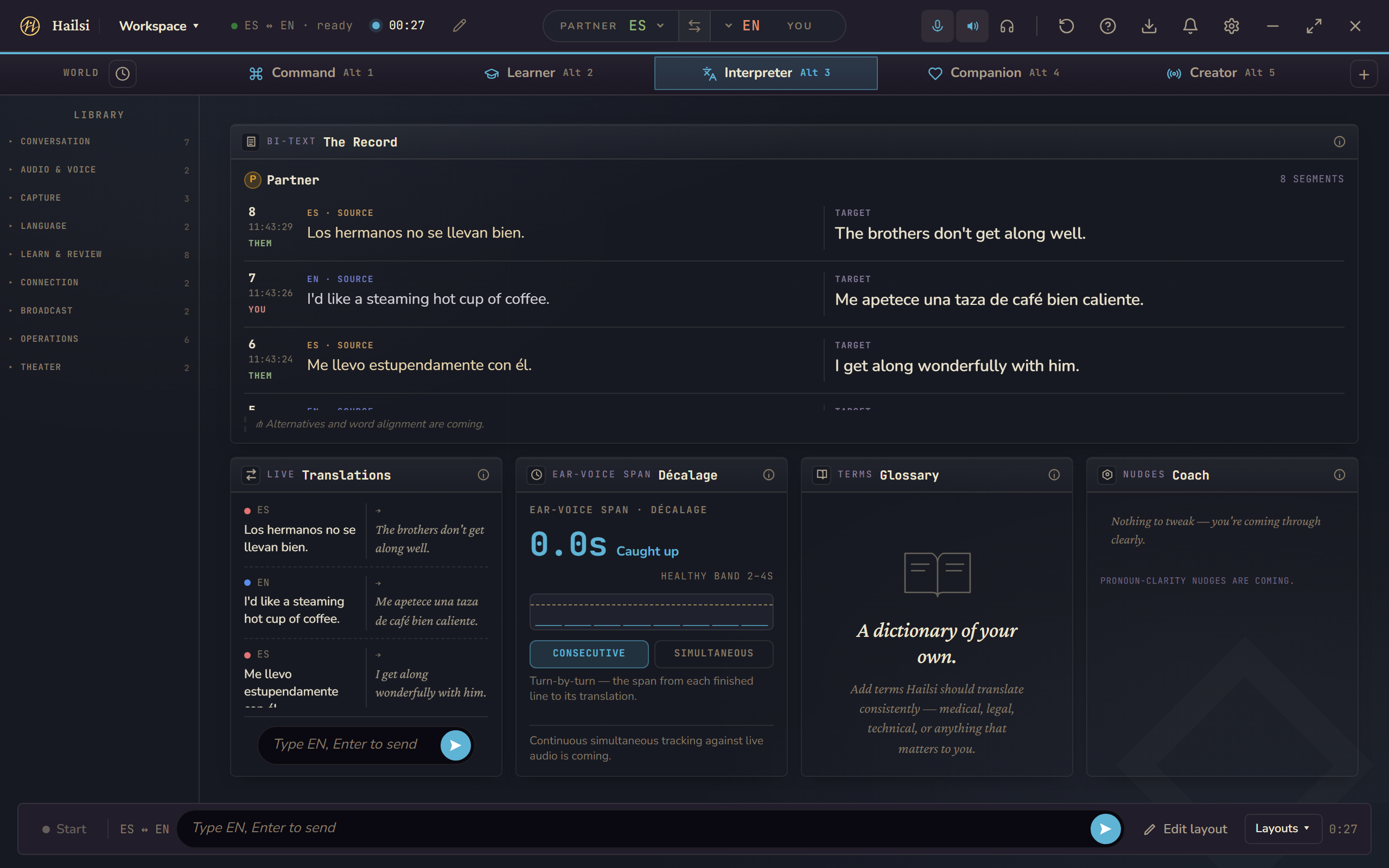
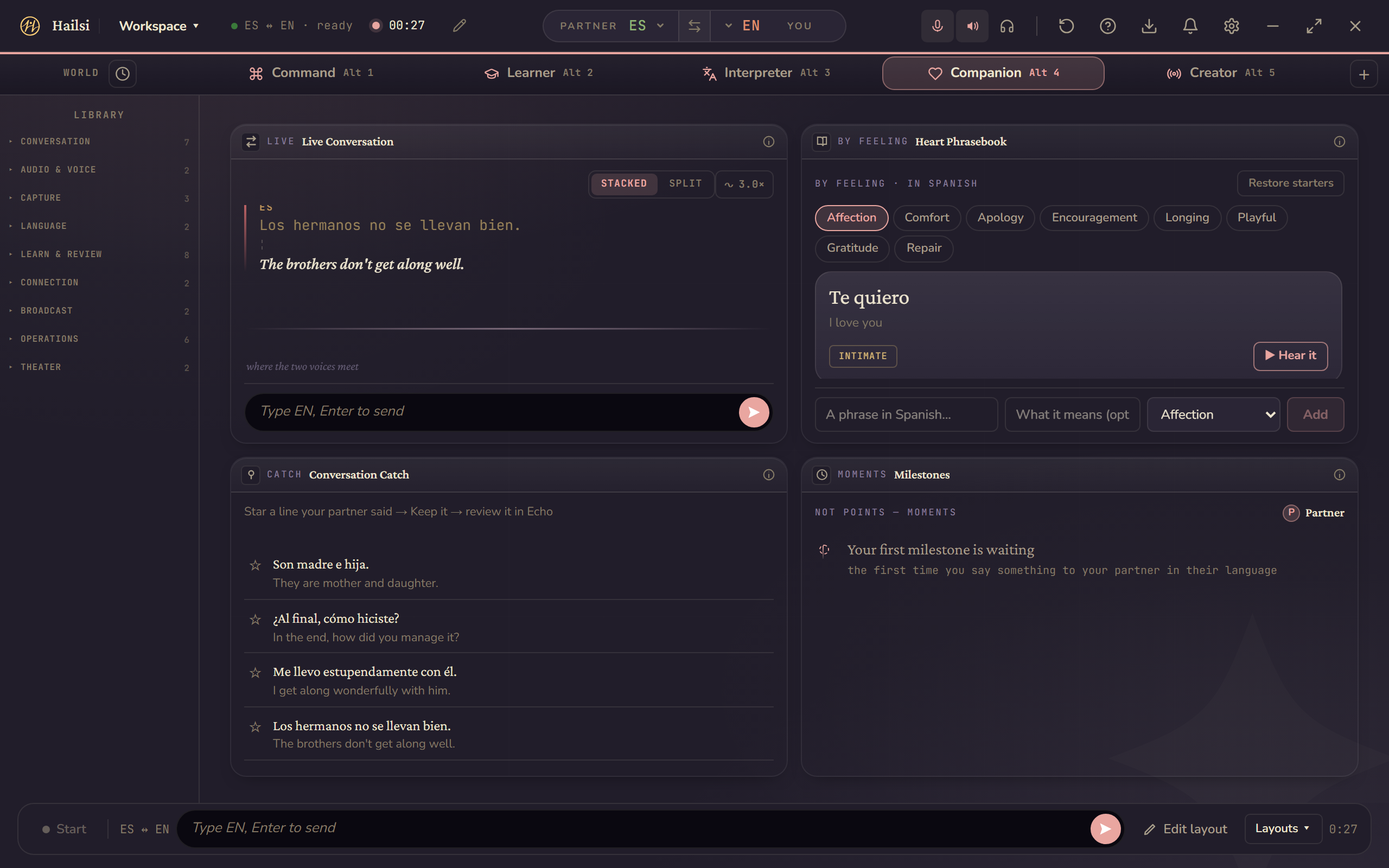
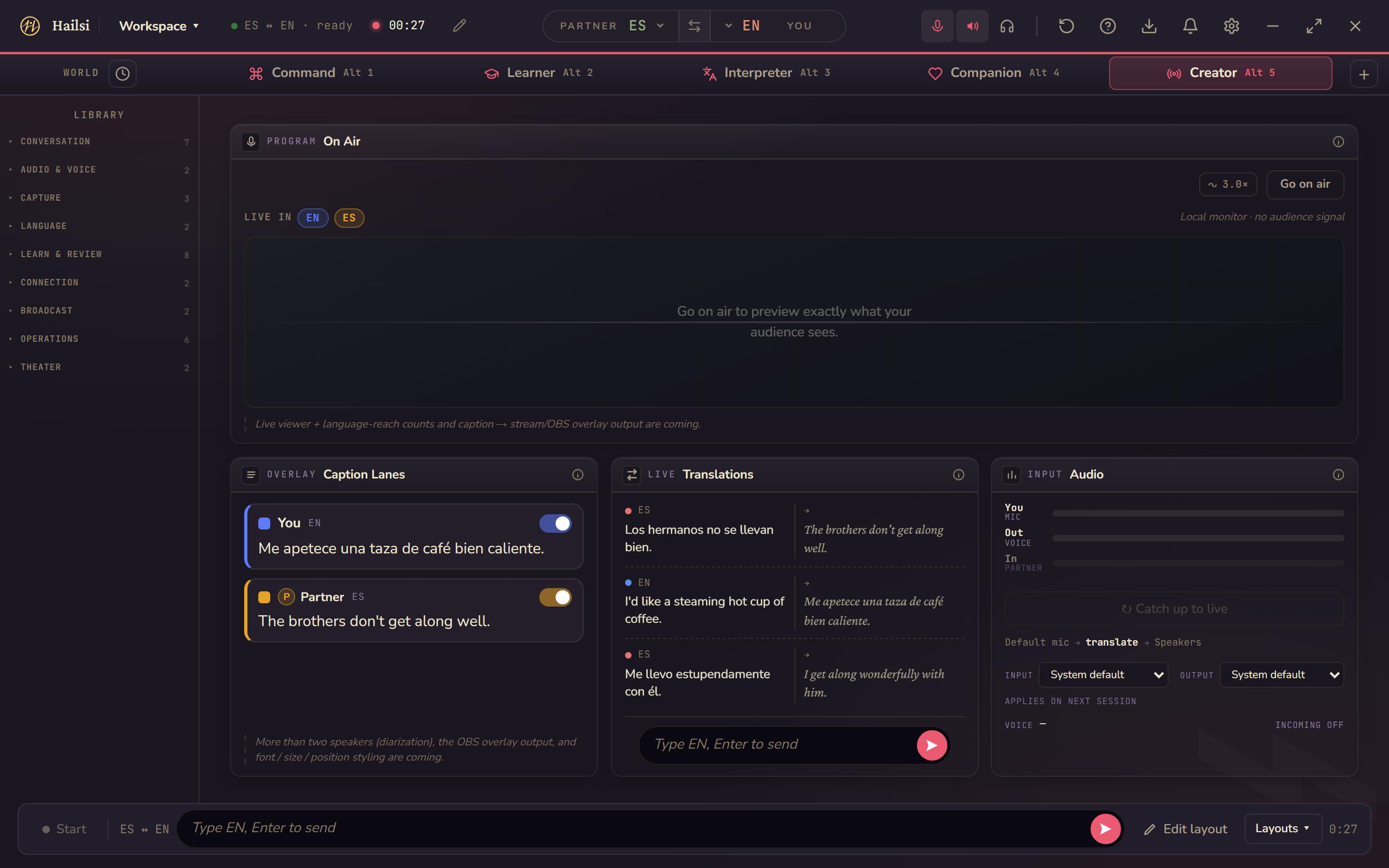
The free modes carry the conversation. The Workspace is the cockpit Pro unlocks: 34 panels across six built-in worlds — preset rooms tuned to what the conversation is for. Any panel goes in any world, and you can build your own.
Five worlds are ready the moment you open the Workspace; Theater is one click away when you want it.
Glossary
Your names, your jargon, translated your way. Add a term once and Hailsi keeps it steady across the whole conversation — it holds for what you say and what you type, on every translation route.
Word Harvest & Echo
Word Harvest surfaces the words your partner keeps using that you haven't saved yet. Catch one, and the whole line lands in Echo — a real spaced-repetition review deck built from your own conversations, not a generic word list.
Produced & Untether
Produced lights up the moment a word you've been studying shows up in your own speech. Mark words mastered, then tell Untether how far to step back — it starts holding back the translations you no longer need. The app deliberately weans you off itself.
Sessions & export
Your conversation history persists; the Sessions panel keeps whole conversations to browse, reopen, and export — Word, PDF, subtitles, plain text, or JSON — for the calls worth keeping. (A Link partner's words stay out of it, by design.)
The interpreter's bench
Find searches everything said, in both languages. The Record lays out the numbered, timestamped bi-text. Balance shows who's holding the floor. Entity Lock pulls the numbers, names, dates, and IDs it spots into copy-ready chips.
Theater
Play a local film or video with synced dual-language subtitles — half to double speed, exportable as .srt or .vtt. The Workspace as a two-language screening room.
Milestones logs the moments too — the first exchange, the first time you spoke their language — never streaks, never points. Pro is the only gate: inside, all 34 panels are yours.
Private by default
Private, because it runs on your machine.
Your PC does the translating, right where you are — that's why it's private, and why it works offline. Speech recognition, translation, and the voice itself all run locally. There's no code that uploads your audio or transcripts to any server, and no analytics or telemetry in the app.
Your translated voice reaches the other person the same way your real voice would — as sound in the room. Nothing else in the pipeline touches the network.
What touches the network — the honest list
- NeverYour audio, your transcripts, your conversations — on the core path there's no code that uploads them, and an automated guard test fails if networking code ever appears in the engine.
- When the app startsAn update check and a signed model-catalog check against hailsi.com's update server. No account, no identifiers — your app version is compared locally, not sent.
- If you buy ProLicense activation — and, on activated Pro installs, an automatic license re-check at launch and roughly every six hours — with Lemon Squeezy, our merchant of record. That six hours is how often Pro tries when it has a connection, not a deadline it has to meet: Pro works offline once activated and stays unlocked offline indefinitely, whether a re-check ever gets through or not. The free tier never contacts a license server at all.
- When you add a languageModel downloads you choose to install — fetched from Hailsi's download host (with a Hugging Face fallback), integrity-checked against a signed catalog.
- When a fast voice speaksA one-time download of goruut, the open-source pronunciation engine the fast voice tier uses to turn text into sounds — about 635 MB, fetched from GitHub, or from hashtron.cloud if GitHub can't be reached, and checked against its published hash. It runs entirely on your machine afterwards; nothing you say is sent to fetch it.
- Link sessions onlyIf you start a Hailsi Link session, a small relay pairs the two devices and — like any server — sees each side's IP address. Your conversation then travels between the two apps over a text-only channel, encrypted in transit: normally directly, and through Cloudflare's TURN service when no direct path can form. Matching the six-icon safety code confirms you're connected to your partner and not an impostor.
That's the whole list. No analytics, no telemetry, no accounts — there is no analytics code in the app, and Hailsi does not track how you use it.
Two people. One language in the way. Gone.
That's the machine. Here's who it's for.
Who it's for
Built for the conversations that matter.
The squad that doesn't share a language
It's 11 p.m. and your duo partner calls the play in Portuguese — you hear it in English, out loud, mid-fight. Nobody typed anything. Nobody alt-tabbed.
You win the round without touching a keyboard.Their family, finally
Sunday lunch at your partner's mother's. She speaks Finnish; you don't — yet. You ask about the market haul and the weather, and she hears it in Finnish, in a warm natural voice — not a robot reading subtitles at her.
Two hours fly by. Nobody reached for a phrasebook.Grandkids across an ocean
Your granddaughter grew up in another language. Every Saturday she tells you about school, and every word arrives in yours, spoken gently out loud. You answer, and for the first time she giggles at your jokes.
The jokes finally land.Who made it
Hailsi started as a bridge for someone in my life — a way to talk across a language I didn't have. Somewhere along the way it hit me that I could do more than build something for one conversation: I could extend that bridge and give it to everyone. I hope Hailsi connects people the way it first connected me.
Made by one person · support@hailsi.com
Pricing
The free tier is the product.
Not a demo, not a trial. The full pipeline, free, forever on your machine.
Free forever — no account, no trial clock.
- The full real-time translation core: speech in, translated voice out
- Runs entirely on your device, offline after the first download
- Conversation, Floating & Compact modes
- Every language, every voice — nothing held back for Pro
- GPU acceleration included — speed is never a paid tier
- Hailsi Link included — a line to another Hailsi user, encrypted in transit and safety-code confirmed
Signed for Windows 10 (22H2) and Windows 11. On a brand-new release SmartScreen may show a warning — choose More info, then Run anyway.
The Workspace, and everything that comes with living in it.
- Unlocks Workspace: 34 panels across six worlds — the full multi-panel mode
- Sessions with rich export — Word, PDF, subtitles, and more
- A purchase, not a rental — one payment, three machines, works offline once activated
- The free tier stays fully working either way
30-day refund. Not what you needed? Email support@hailsi.com within 30 days of buying Pro and you get your money back. No form, no questions. Payments run through Lemon Squeezy, our merchant of record, and your statutory consumer rights apply on top.
No subscription. We don't want a monthly relationship with your wallet.
License terms: the Hailsi EULA, in effect from 2026-09-25.
Questions
Asked and answered.
What languages does Hailsi support?
Over 400 languages, all translated locally on your device — not just one pair. Hailsi routes each pair through the best model it has for it, and shows a per-language star rating right in the app (measured against a reference benchmark; languages that haven't earned a star just say "Supported"), because quality genuinely varies by pair. Spoken voice output covers 15 languages today, microphone transcription covers 58, and every language gets live translated text — type instead of speaking for the ones the microphone doesn't cover yet.
What does it cost?
The free tier is the real product — full real-time voice translation, running entirely on your computer, free and genuinely useful on its own, not a crippled demo. Hailsi Pro is a one-time $39 purchase that unlocks Workspace, the full multi-panel mode. No subscription, no recurring billing, nothing to cancel — see the pricing section above. A separate $9.99 Living Theme Pack add-on exists for people who want the animated themes.
How do refunds work?
30-day refund. Not what you needed? Email support@hailsi.com within 30 days of buying Pro and you get your money back. No form, no questions. Payments run through Lemon Squeezy, our merchant of record, so the refund itself is issued by them; if the law where you live gives you a right to withdraw from a download purchase, that applies as well.
Does it work offline?
Yes. The free tier runs everything locally — speech recognition and translation happen on your computer. You'll need internet for the initial model download on first launch, and again if you add more languages or voices later or activate a Pro license. Day-to-day translation needs no connection.
What about my privacy?
On the free tier, no audio leaves your device. Speech recognition and translation run locally. We don't transcribe your conversations on a server, train models on your audio, or sell your data. Any future feature that uses the cloud would be clearly labeled and strictly opt-in.
What hardware do I need?
Windows 10 (22H2) or Windows 11 — everything on this page, including incoming translation, works on both. A reasonably capable multi-core CPU — the speed figures on this page come from a 2018 8-core desktop; slower or low-power laptop chips will be slower. Plan for a few gigabytes of free disk space — the app plus your first language pair; more languages, more space. No GPU required; if you have an NVIDIA GPU, Hailsi automatically uses its GPU-accelerated runtime, which speeds up speech recognition and the fast translation path — free tier included.
How is this different from Google Translate or DeepL?
Those are great for typed text or one-shot translations. Hailsi is built for live conversation — you don't paste text into a website. It translates what's happening in real time: the person sitting with you, spoken back to them out loud, and whatever your PC is playing, spoken back to you — Discord, a game, a Zoom call, a video.
Will it work with Discord, Zoom, or Teams?
For what you hear, yes. Turn on incoming translation and Hailsi listens to your computer's own audio — the other side of the call, or any video — and speaks it to you in your language through your headphones, with a live transcript. You can point it at one app or at all system audio, and the other person doesn't need Hailsi installed.
Being understood works differently: Hailsi speaks your translation out loud on your side rather than appearing to the call app as a microphone. So that direction works when the other person is in the room with you — or, if you both have Hailsi, over Link.
What is Hailsi Link?
Link is for when the other person has Hailsi too (it's free for both of you). One of you creates a Link and shares a short code; the other enters it in their own Hailsi app. You each confirm the same six-icon safety code — proof you're connected directly to your partner, not an impostor — then you type a line and it arrives in their language: spoken aloud in the voice they picked when their language has a catalog voice (15 today), and always as live text. Only text crosses the wire, encrypted in transit; your voice never leaves your machine, and your partner's words are never saved on yours.
It's the counterpart to speaking out loud: out loud is for the person in the room with you, who needs nothing installed; Link is a line between two Hailsi apps when you're apart.
Can it help me actually learn the language?
Yes — deliberately, and without gamification. In the Workspace (Pro), the conversations you're already having become the study material: star a line your partner said, keep it, and it lands in Echo, a real spaced-repetition review deck; Word Harvest surfaces the words they keep using that you haven't saved; Produced lights up when a word you've been studying shows up in your own speech; and as you master words, Untether can start holding back translations — you choose how far it steps back, weaning you off the translator at your own pace. Milestones logs moments — never streaks, never points.
What if it makes a mistake?
It will, sometimes — voice translation isn't perfect, especially with names, slang, or technical jargon. Each translation shows the original transcript so you can catch when something feels off. You should never have to wonder what was actually said — that's deliberate.
Will it sound like my voice?
No — and that's deliberate. Hailsi speaks your translation in a clear, natural voice you pick from its catalog, per language, with an in-app preview and speed and pitch controls. It does not clone or imitate your voice. Voice cloning raises consent problems we're not willing to hand-wave, so v1.0 ships without it.
What does "Hailsi" mean?
From Estonian: hääl (voice) + sild (bridge). A voice-bridge between languages. Pronounced roughly "HAIL-see."
Why Windows only?
It's where the developer works daily, so it's where the build can be tested reliably. If you'd run this on Mac or Linux, email support@hailsi.com and say so.
When can I try it?
Now. The Download button at the top installs Hailsi — the free tier needs no account and no key. Pro is a one-time purchase; see Pricing above. Each release is listed on the What's new page.
Get notified at launch
Hailsi is in private development. Drop your email and we'll let you know when v1 ships. No spam, no marketing blasts — just one note when it's ready.
Or email hello@hailsi.com directly.
Questions? Ask the person who built it.
Hailsi is out. If something isn't working, or there's something you want to ask before you buy, email support — it reaches one person, and you'll get a real answer back.
Say it your way. Let them hear it theirs.
Free on Windows 10 (22H2) or Windows 11 · The person you're talking to installs nothing.
Questions before you install? support@hailsi.com or the Hailsi Discord — both in the footer.